You’ve published blog posts. You’ve added keywords. You’ve checked every box you can find online and your pages still aren’t ranking. Sound familiar?
You’re not alone. On-page SEO is one of the most misunderstood parts of digital marketing. Most guides give you a checklist, not a real explanation of why each step matters. The result? You do the work, but the rankings don’t move.
This guide changes that. We’ll walk through 7 proven on-page SEO steps you can apply to any page right now with clear explanations of why each one works and what to do first.
Table of Contents
What Is On-Page SEO?
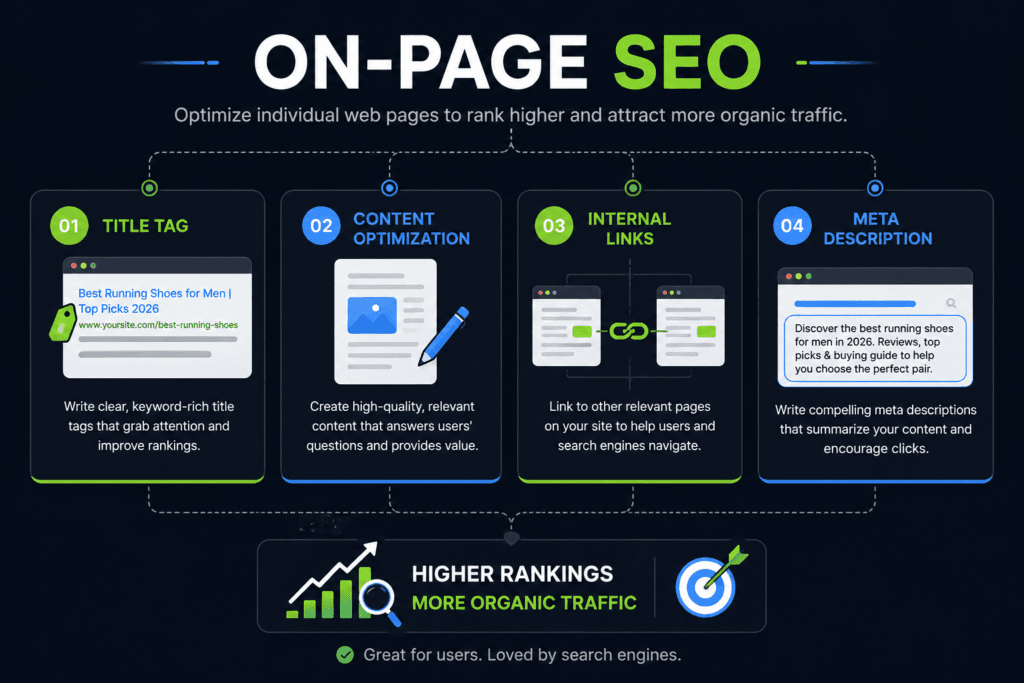
On-page SEO is the practice of optimizing individual web pages so they rank higher in search engine results and attract more relevant organic traffic. Every optimization you make directly on a page the content, the HTML structure, the keyword placement, the internal links falls under on-page SEO.
It’s different from off-page SEO, which covers external signals like backlinks, brand mentions, and social sharing. On-page SEO is entirely in your control. That’s what makes it so powerful and so worth getting right.
In 2026, on-page SEO goes beyond just placing keywords in the right spots. Google now evaluates whether your page actually answers what the user is looking for, whether your content demonstrates real expertise, and whether your page delivers a fast, readable experience. On-page SEO connects all of those dots.
Step 1: Match Search Intent Before You Write a Word
Here’s a mistake that kills rankings before a page even goes live: writing content that doesn’t match what the searcher actually wants.
Search intent is the reason behind a search query. When someone types “on-page SEO,” are they looking to learn what it is? Download a checklist? Hire an expert? Google is exceptionally good at detecting the answer and it rewards pages that match it.
There are four types of search intent you’ll encounter:
Informational The user wants to learn. (“What is on-page SEO?”) Navigational They’re looking for a specific site. (“Semrush on-page SEO tool”) Commercial They’re comparing options. (“Best on-page SEO tools 2026”) Transactional They’re ready to buy or act. (“Hire on-page SEO expert”)
Before you write anything, search your target keyword in Google. Look at what’s ranking on page one. Are those pages blog posts? Product pages? Listicles? Guides? That’s your signal. If Google is ranking step-by-step tutorial articles for your keyword, a sales page will not rank . no matter how well it’s optimized for everything else.
On-page SEO built on the wrong intent is on-page SEO built on sand.
Want to go deeper on understanding search intent and how to apply it across your whole content strategy? Read: [YOUR BLOG LINK — keyword research and search intent]
Step 2: Master Title Tag Optimization
Your title tag is the single most important on-page SEO element you’ll optimize. It’s the clickable headline in Google’s search results, and it tells both users and search engines exactly what your page is about.
Poor title tag optimization is one of the most common reasons strong content fails to rank or ranks but gets ignored.
Here’s what a well-crafted title tag requires:
Include your primary keyword near the front. Google scans title tags from left to right. If your on-page SEO keyword appears midway through a long title, you’ve weakened its signal. Lead with it.
Keep it between 50 and 60 characters. Google truncates titles beyond roughly 600 pixels (around 60 characters). Anything cut off is invisible to searchers. Every character counts.
Make it compelling, not just accurate. “On-Page SEO Guide” is technically correct. “7 Proven On-Page SEO Steps That Actually Boost Rankings in 2026” is the same topic but far more likely to earn a click. Numbers, benefits, and a sense of urgency all move the needle on click-through rate.
Write a unique title for every page. Duplicate title tags confuse search engines about which page to rank for which query. Every page on your site should have its own distinct title tag.
Bad example: On-Page SEO | Blog | Site Good example: 7 Proven On-Page SEO Steps That Actually Boost Rankings in 2026
Title tag optimization is the fastest on-page win available. When traffic is low despite decent rankings, revisit your titles first.
Step 3: Write a Meta Description That Earns the Click
A meta description doesn’t directly boost your on-page SEO rankings. But it directly affects your click-through rate and CTR is a behavioral signal that influences where you rank over time.
Think of your meta description as the pitch that happens after your title tag catches the eye. It lives beneath the title in search results, and it has about 160 characters to convince someone to click your link over the five others next to it.
A strong meta description for on-page SEO content does three things:
- Echoes the primary keyword — Google bolds matched terms in search results, drawing the eye directly to your snippet.
- States the value clearly — Tell the reader exactly what they’ll get: a checklist, a guide, a framework, a specific number of steps.
- Ends with a soft action nudge — Phrases like “learn how,” “find out,” or “start here” create forward momentum without feeling like a hard sell.
Example of a weak meta description: “On-page SEO is the process of optimizing your website pages for better rankings.”
Example of a strong meta description: “Master on-page SEO with 7 proven steps from title tag optimization to search intent, internal linking, and content depth. Rank higher today.”
The second version is specific, keyword-rich, and gives the reader a concrete reason to click. Write every meta description like you’re writing an ad.
Step 4: Structure Your Content with the Right Headers
Header tags H1, H2, H3 do two jobs at once. They help search engines understand the hierarchy and topics within your content, and they make your page dramatically easier for humans to read and skim.
Your H1 is your page’s main title. There should only be one, and it should include your primary on-page SEO keyword naturally. Think of it as the headline of the entire page.
H2 tags are your major section headings. Each H2 signals a new topic cluster to Google. When you structure your H2s around the questions your target audience is actually asking the same questions you’d find in Reddit threads, Quora answers, and Google’s People Also Ask you dramatically improve your topical coverage.
H3 tags break down sub-points within each H2 section. They’re useful for step-by-step processes, sub-categories, and supporting details.
A few rules that matter for on-page SEO header structure:
- Include your focus keyword in at least one H2 (not stuffed naturally placed)
- Write headers that answer questions, not just label topics (“How to Optimize a Title Tag” beats “Title Tags”)
- Keep headers short enough to scan at a glance two lines max
According to a Surfer SEO study analyzing over one million search results, topical coverage how well your content addresses a subject across multiple related subtopics is the single most important on-page factor for ranking in 2025 and 2026. Headers are the scaffolding for that coverage.
Step 5: Use Keywords Naturally (Not Obsessively)
Here’s where most beginners go wrong with on-page SEO: they either ignore keyword placement entirely, or they stuff keywords into every third sentence until the content reads like it was written by a malfunctioning robot.
Neither approach works. Here’s the framework that does.
Know your target density. For a 2,000-word post, your primary on-page SEO keyword should appear roughly 20 to 40 times that’s a 1% to 2% density range. Below 1% and the page is under-optimized. Above 2% and you risk a keyword stuffing penalty.
Place keywords strategically. There are specific locations where keyword placement carries more SEO weight:
- The first paragraph (within the first 10% of the content)
- At least one H2 or H3 subheading
- The image alt text
- The URL slug
- The title tag and meta description (covered above)
- Naturally distributed throughout the body
Use semantic variations and LSI keywords. Google’s natural language processing is sophisticated enough to recognize that “on-page SEO,” “on-site optimization,” and “page-level SEO factors” are related concepts. Weaving in these semantic variations actually helps your ranking without forcing awkward repetition of the exact same phrase.
Write for the reader first. The clearest test: read your content out loud. If the keyword placement sounds forced, it is. Rewrite the sentence so it flows naturally the SEO signal is secondary to the reading experience.
Step 6: Build a Strong Internal Linking Strategy
Internal linking is one of the most underutilized on-page SEO techniques, and it’s completely free to implement.
An internal link connects one page on your website to another page on the same site. When done well, internal linking accomplishes three important things:
It passes authority between pages. When a high-traffic, well-ranking page links to a newer or lower-authority page on your site, it shares some of its ranking power. This is often called “link equity” or “link juice,” and internal linking is one of the most reliable ways to distribute it.
It helps Google discover and index your content. Search engine crawlers follow links. If a page on your site has no internal links pointing to it, Google may not find it or may not find it quickly. Every new piece of content should receive at least one internal link from an existing page.
It improves user experience and time on site. When readers find relevant content linked naturally within an article, they stay longer and explore more. That engagement sends positive behavioral signals back to Google.
Practical internal linking rules for on-page SEO:
- Aim for 2–4 internal links per page (at minimum)
- Use descriptive anchor text not “click here,” but the topic you’re linking to
- Link to pages that are genuinely relevant to the current content
- Prioritize linking to your most important pages (pillar content, high-converting pages, cornerstone guides)
For a deeper look at how to build a site architecture that makes internal linking effortless, read: [YOUR BLOG LINK : site structure and content silos]
Step 7: Optimize Images and Page Experience
Image optimization is often treated as an afterthought in on-page SEO. It shouldn’t be particularly since Core Web Vitals became an official Google ranking factor.
Every image you publish carries three SEO opportunities most people miss.
Alt text. Alt text is the HTML attribute that describes an image for screen readers and search engines. It’s one of the only remaining places where your focus keyword placement has a direct impact on on-page SEO signals. Write alt text that describes the image naturally and includes your keyword where it fits. If it doesn’t fit naturally, don’t force it.
File name. Before uploading an image, rename the file descriptively. “on-page-seo-checklist.png” is indexed by Google; “IMG_3847.png” is not.
File size and loading speed. Slow pages lose rankings. Google’s Core Web Vitals measure real-world page loading performance, and large uncompressed images are one of the most common culprits. Compress every image before uploading using a tool like TinyPNG or Squoosh. Aim for files under 200KB wherever possible.
Beyond images, your page experience signals for on-page SEO also include mobile responsiveness (Google indexes the mobile version of your page first), HTTPS security, and avoiding intrusive interstitials that block content.
According to Google’s own developer documentation, pages that score well on Core Web Vitals particularly Largest Contentful Paint (LCP) and Cumulative Layout Shift (CLS) receive a ranking boost over comparable pages that perform poorly. Image optimization is the fastest path to improving both metrics.
Frequently Asked Questions
Q: What is the difference between on-page SEO and off-page SEO?
A: On-page SEO refers to all optimizations made directly on a web page content quality, title tags, meta descriptions, header structure, internal linking, image alt text, and keyword placement. Off-page SEO covers external signals like backlinks, brand mentions, and social sharing. Both matter, but on-page SEO is entirely within your control.
Q: How long does on-page SEO take to show results?
A: Most on-page SEO changes take 4 to 12 weeks to reflect in rankings. For newer sites or highly competitive keywords, the timeline can extend to 3 to 6 months. Factors like your site’s existing authority, crawl frequency, and the competitiveness of your target keyword all affect the timeline. Consistency matters more than speed.
Q: Does the meta description affect Google rankings?
A: Not directly. Google has confirmed that meta descriptions are not a ranking factor. However, a well-written meta description improves click-through rate (CTR), which is a behavioral signal that can indirectly influence rankings over time. More importantly, a strong meta description brings more traffic to a page that’s already ranking making it a high-value optimization regardless.
Q: How many keywords should I target per page for on-page SEO?
A: Focus on one primary keyword and two to three closely related secondary keywords per page. Targeting too many unrelated keywords on a single page dilutes your topical focus and confuses search engines about what the page is actually about. Topical depth on one subject consistently outperforms shallow coverage spread across many keywords.
Founder of Saga Creative Studios. Nithish helps D2C and local brands in Bangalore grow on Instagram through reels, paid ads and content that converts.